Description
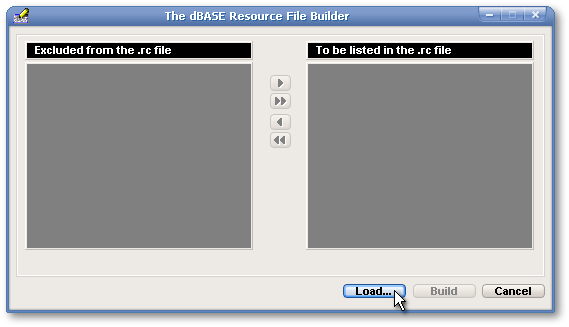
Most C++ compilers need a resource file in order to create a DLL aimed at storing images. The dBASE Resource File Builder allows the user to create such a .rc file in a few easy steps. First, click on the Load… pushbutton to select the folder where are located the images to be listed in the resource file.
As soon as a folder is selected, the filenames of all the images in that folder become listed in the Excluded from the .rc file listbox, at left. Use the Add or Add All pushbuttons to prepare the list of the filenames to appear in the .rc file.
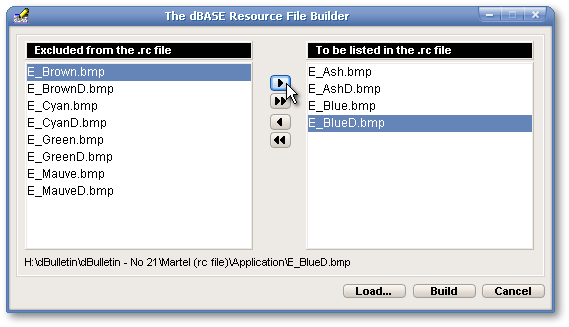
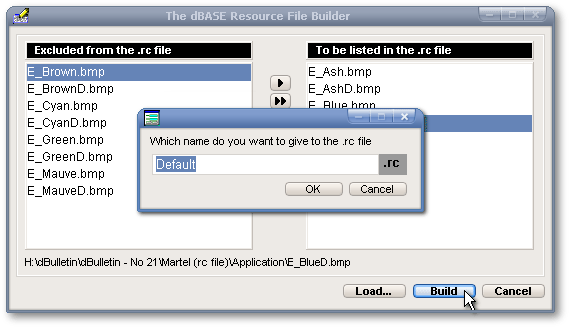
When the list is completed, click the Build pushbutton and write the name of your resource file in the dialog box. Finally, click the OK pushbutton.
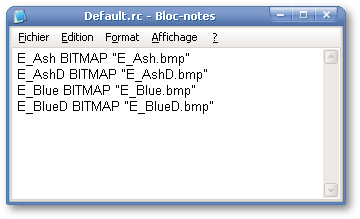
The following message box will appear as soon as your resource file has been saved (note: it is saved in the current folder — where your image files are located). The message box offers the possibility to consult the .rc file. If the user clicks on the Yes button…
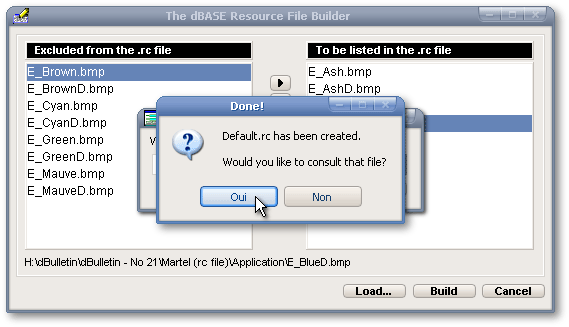
…it will be loaded in Notepad. Otherwise, the user is brought back to the main form of the dBASE Resource File Builder.
Shortcommings
The dBASE Resource File Builder will only deal with filenames of images that have the following extensions: .bmp, .gif, .ico, .jpg or .jpeg, .tif or .tiff, .png, .wmf, .xbm, .dib, .emf, .pcx and .eps.
Installation
History
Nothing.